Find a repair
When you finish: You find any repair in seconds, by number, name, email, item or a scan.
About 2 minutesLast checked against the app:
- Step 1: Open Repairs (Tickets on the RepairDesk website).
- Step 2: Type in the search box: the repair number, the customer name, their email, their phone number, or a word from the item, for example Seamaster.
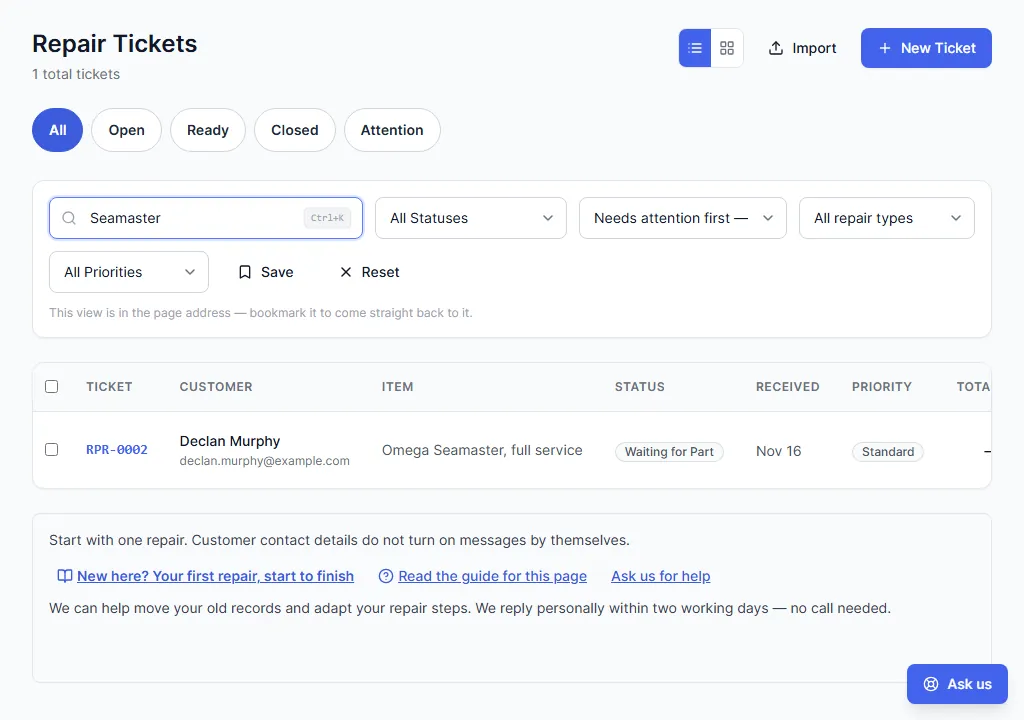
- Step 3: Press the repair to open it.
A phone number needs at least 7 of its digits. Spaces, brackets and the country code do not matter.
Scan the label
- Step 1: Open Scan, press Start Camera and hold the label to the camera. Or type the number under Manual Lookup and press Look Up.
Inside Shopify, the camera sometimes cannot open on the page. If you see Scan in a new tab, press it and scan there.
Stuck?
Press Ask us at the bottom right of any RepairDesk page and tell us which step. We write back with the exact next step.
Or email support@repairdeskapp.net